
میتوانید برای مشاهده محصولات بیشتر به صفحات زیر بروید

This information is completely taken from the website https://www.laptopu.ro
Repairing is now as simple as counting from 1 to 3.
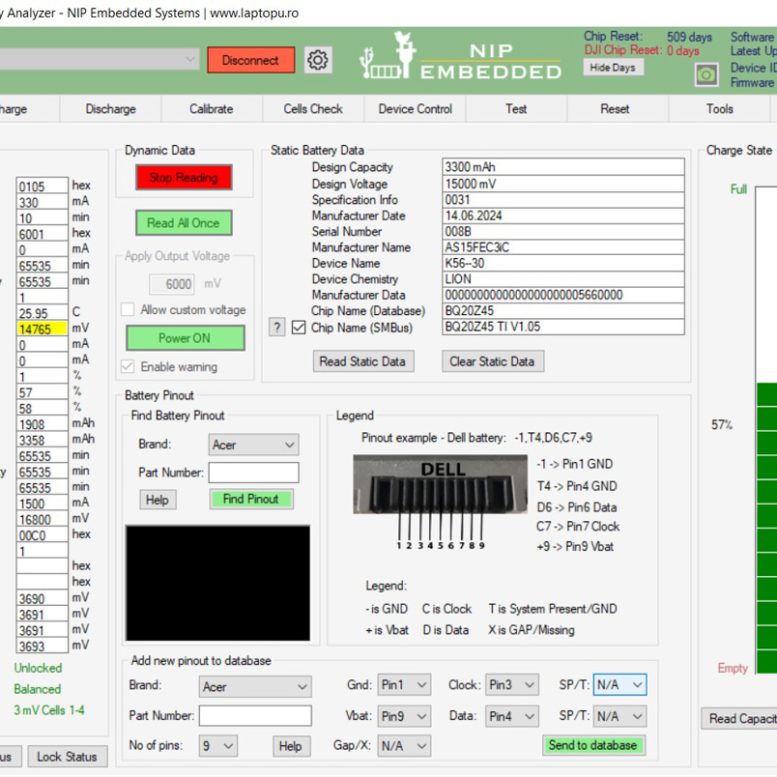
Step 1 – Read Parameters (the software marks the failure)
Step 2 – Chip Selection (it is detected automatically most of the time)
Step 3 – Unseal the battery and Clear Chip Errors
Repairing a laptop battery requires first an analysis to identify the fault. In most cases, the fault appears when at least one cell gets over-discharged. For example, the battery is stored for a long period without being charged. In this case, the over-discharged cells have to be pre-charged to at least 3000mV. Now, the chip errors can be cleared and the fault will not appear since the cells voltages are fine.
When a battery requires special attention, just open a topic on the NLBA1 community and we will be there to offer the best support.

Our Reset Feature unseals most of the chips using the master password within a few seconds. Using a master password is fast and professional.
Unsealing the battery is mandatory to change the chip parameters. All laptop batteries have SEALED chips.
No need to try different passwords from a database.
No need to fully discharge the laptop battery.
By pressing the “Unseal” button the chip is unsealed and switched to FAS (Full Access) mode.

All battery parameters are stored in the EEPROM/Dataflash of the chip.
The Reset Option can read and write the full EEPROM image. After reading, the content of the EEPROM can be stored in a file on the computer. In the same way, the saved EEPROM image can be loaded and written using the Write functionality.
Using this feature, laptop battery parameters can be changed, or even batteries with the same part number can be copied. For example, the FCC can be found in the HEX value inside the EEPROM file, we have even created a Tutorial on How to Change the FCC value directly in the EEPROM file.
The EEPROM image is checked before starting the writing process.

A laptop battery stops working and sets a PFF (Permanent Failure Flag) when it detects a failure.
There are several types of failures but the most common one is over-discharged cells.
After fixing/replacing bad cells and checking the thermal fuse, clearing PFF is mandatory.
Our Reset feature can clear the PFF with just one button.
Some batteries are using multiple PFFs, do not worry, everything is implemented behind the “Clear Chip Errors” button.
The Chip Reset option is User Friendly, it does not require deep technical know-how, with just a few buttons, the user can repair a laptop battery.

The Reset Feature can edit the most important parameters in the battery chip EEPROM.
The parameters that can be changed after unsealing are: Date, Cycle Count and FCC.
The other parameters, if needed, can be changed into the EEPROM image.
Note that resetting the Cycle Count parameter to 0 does not bring the battery back to life. Only Clearing Errors will make the battery work again if the cells are good.
There are Texas Instruments that are using the Impedance Tracking Algorithm to learn the FCC based on many parameters. These chips do not support direct FCC edit, any write attempt to this parameter will be ignored by the chip.

| Texas Instruments BQ208XX | bq2083, bq2084, bq2085, bq20695a, bq20853, bq20857, bq20864, bq20869, bq20870, bq20882, bq20886, bq20887, bq20889, bq20891, bq20894, bq20895 |
| Texas Instruments BQ20ZXXX | bq20z40, bq20z45, bq20z451 (Apple Macbook Batteries, all firmware version), bq20z453, bq20z456, bq20z459, bq20z60, bq20z65, bq20z655, bq20z70, bq20z701, bq20z704, bq20z75, bq20z80, bq20z90, bq20z91, bq20z95, bq20z951, bq20z955 |
| Texas Instruments BQ803XX (Sanyo) | bq8030, bq8030a (Including Lenovo bq8030a) |
| Texas Instruments SN803XX | SN8030, SN80305, SN80306 |
| Texas Instruments BQ304XX | bq30420, bq30421, bq30422, bq30423, bq30424, bq30471, bq30472 |
| Texas Instruments (Firmware Sanyo) | bq8050, bq8050-D1, bq8055, bq8055a (Including Lenovo bq8055a) |
| Texas Instruments BQ9000 Sanyo | BQ9000 Sanyo |
| Texas Instruments BQ40XXX | bq4050, bq4055, bq40z50, bq40z55, bq40z551, bq40z555, bq40z556, bq40z557, bq40z453, bq40696a, bq40Z695A, bq40Z696A, bq40Z697A, bq40Z795A, bq40320, bq40370 |
| Apple Macbook Batteries | All Apple Macbook Batteries are supported (chips: bq20z451 and bq40z651, all firmwares) All Macbook batteries up to 2023 are supported |
| Texas Instruments BQ30ZXXX | bq30z55, bq30z551, bq30z554, bq30z55, bq3050, bq3055, bq3060, bq30695a |
| Renesas | 045A20 (LGC) |
| Supported Operations | – Unseal all the chips within seconds using the master password – Unlock / Clear PFF (Permanent Failure Flag) – Read EEPROM/DataFlash – Write EEPROM/Dataflash – Update manufacturer date – Update cycle count – Update FCC (Full Charge Capacity) |
| Supported Devices | - NLBA1 - It works with TI EV2300/EV2400 |
| Note | Above Supported Operations could not work on some particular chips |
شما همچنین می توانید یک پرسش در مورد این محصول ثبت کنید
هنوز امتیازی ثبت نشده است
شما هم میتوانید در مورد این کالا نظر دهید.
اگر این محصول را قبلا خریده باشید، دیدگاه شما به عنوان خریدار ثبت خواهد شد.


























دیدگاه خریدار